HIIT for Musicians HIIT for Musicians
HIIT for Musicians
High Intensity Intelligent Training

Practise like you train.

Interval training applied to musical practice.

Isolate exactly what you need to work on — an exercise, study, passage, orchestral excerpt or a specific technical problem — define the sets and rest times once, and let the timer and metronome run the session while you play.

And it doesn't have to be repertoire: the same logic can be used for memorisation, improvisation, ear training and other types of study that benefit from structured practice.

Available for Android, currently in testing. iOS version coming soon.
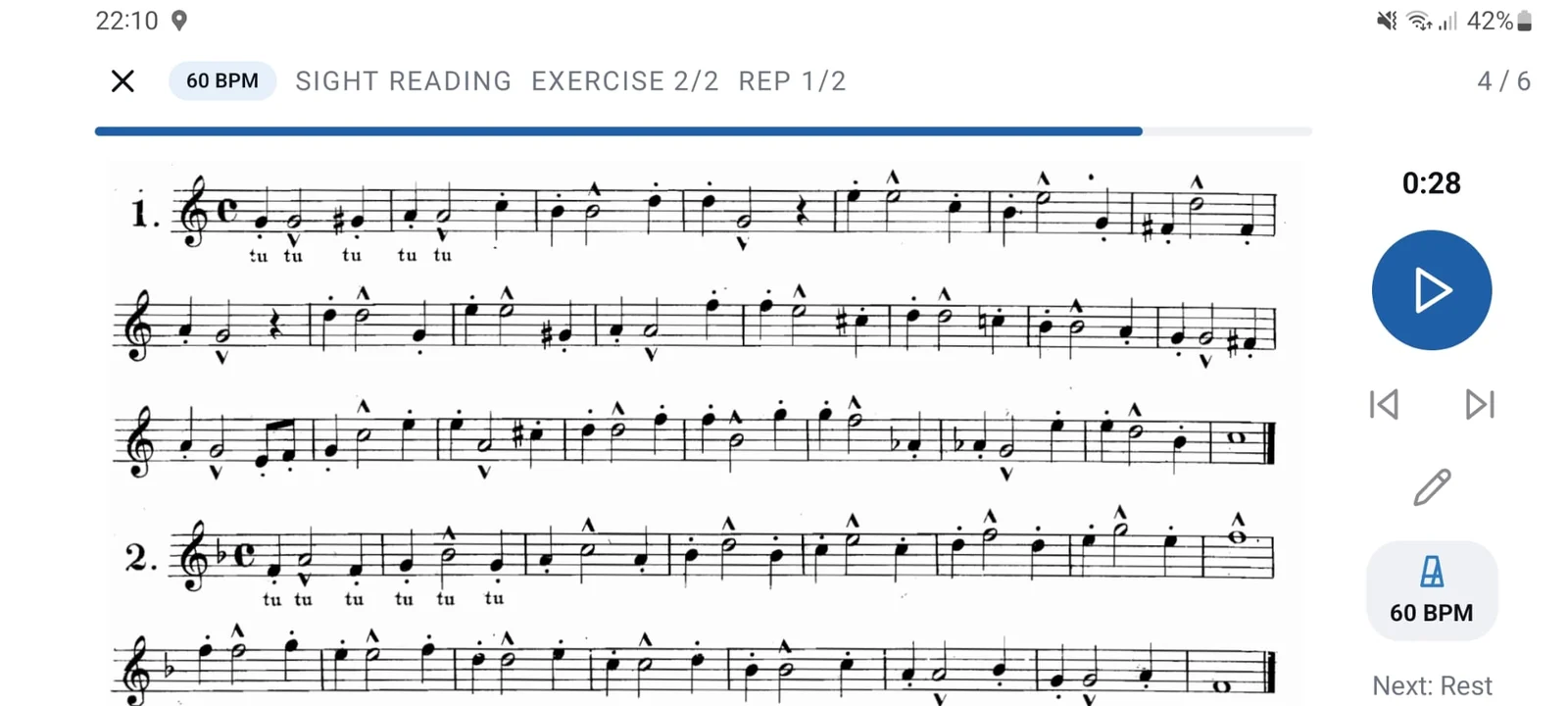
A routine running in landscape, with a full page of music on screen
The marketplace, showing exercises shared by other musicians

The idea

PLAYING for an hour is not the same as STUDYING for an hour

There is already a generation of athletes who have moved away from training through nothing but long runs at a constant pace. Short, intense and focused intervals, with real recovery in between, can produce much more than the same amount of time spent at a comfortable pace.

Musical practice follows a similar logic: we improve at what we deliberately work on, not necessarily at what we simply play for longer.

It could be a difficult passage from a piece, a study, a technical exercise, an orchestral excerpt, a daily routine, a memorisation exercise or a very specific problem that needs to be solved.

The important thing is not how long you practise, but how you organise your practice time.

What usually happens

You sit down to practise with a specific goal.

You want to solve a passage, improve a study, memorise a part, work on a technical exercise or prepare for an audition.

But without a defined structure, you often end up playing other things along the way, repeating what you already know best or simply continuing until you realise you are tired.

Before you know it, an hour has passed — but the problem you wanted to solve was only worked on a few times.

The same thing happens outside the instrument: when we try to memorise material, prepare a presentation, study music theory or learn a script, it is easy to spend a lot of time studying without having a clear structure for repetitions and breaks.

What this app proposes

For example, imagine you want to work on four bars in isolation. You can practise them for two minutes, take a one-minute break and record the tempo (BPM) you were able to maintain.

But this is only one example.

You can do the same with a study, technical exercise, daily routine, orchestral excerpt, repertoire passage or specialised problem-solving work.

You can also use the same logic to memorise a passage, practise improvisation or study music theory concepts, such as sight-singing, solfège and other exercises.

And the principle can go even further. The structure of sets, repetitions and rest periods can also be used to study a script, memorise text or prepare school material before a test.

Choose the tempo you want, define the practice duration, set the rest periods and organise the number of repetitions according to what you want to improve.

The app gives you greater control over your practice and helps you track your progress more clearly over time.

Instead of deciding halfway through a session what to do next, you define in advance how you want to work and let the app manage the time, repetitions, breaks and, when necessary, the metronome while you focus on what you are learning.

What it does

Four functions, done well

No lessons, no backing tracks, no social media content.

The app stores the material you want to work on, structures the session, keeps the beat when needed and records what happened.

The excerpt, exercise or study material

Take a photo of a page or import a PDF and choose exactly what you want to work on.

It can be a passage from a piece, a study, a technical exercise, an orchestral excerpt, a music theory page or any other study material.

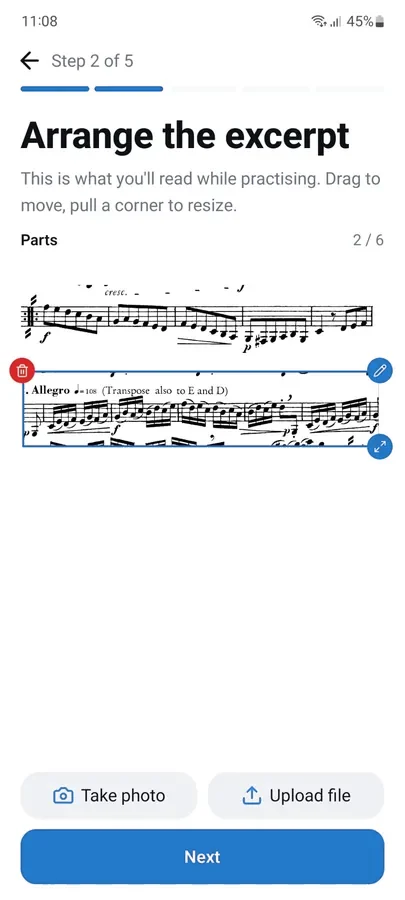
Crop only the part that matters and organise up to six excerpts — even from different sources — on a single screen.

Routines with sets and breaks

Create sections that repeat and exercises within them, each with its own repetitions.

You can create a specific routine to solve a problem, a daily technical routine, an audition preparation session, a memorisation routine or simply a sequence of exercises that you want to repeat regularly.

Rest is defined in advance instead of stopping only when you realise you are tired.

Each exercise can have its own tempo, applied directly to the metronome.

A session that runs itself

A voice countdown starts the session and then the timer controls every repetition and every break while the material remains on screen.

The metronome can be heard, felt through vibration or seen through a visual signal around the edges of the screen.

You don't need to keep looking at the clock or deciding when to stop.

A history you can review

Each completed session records the tempo you reached and how you felt.

Because each routine keeps its own history, you can track the progress of your exercises, studies, passages, routines and memorisation sessions over time.

The question “Am I getting better at this?” no longer depends only on memory or how you feel in the moment.

How it works

Three steps, then just start

1

Choose what you want to work on

Take a photo or upload a file, crop the section you want to practise and give it a name and tempo.

You can save a repertoire passage, study, exercise, orchestral excerpt, music theory page or any other practice material.

Everything is saved in your library and can be reused in different routines.

For activities that don't depend on sheet music, you can simply structure the activity into exercises and sets — for example, to memorise text, study a script or review material.

2

Plan the session once

Choose the exercises you want to do, the number of repetitions, the duration of each one, the tempo and the rest time between them.

You can create a one-off session or a routine you want to repeat regularly.

Everything is defined while you're fresh, rather than improvised when you're already tired.

3

Press start and focus

The initial countdown is spoken aloud, the timer controls the entire routine and the metronome accompanies each exercise at the defined tempo when needed.

At the end, you can record the tempo you were able to maintain and how the session went.

The app

What using it actually looks like

Real screenshots of the Android app.

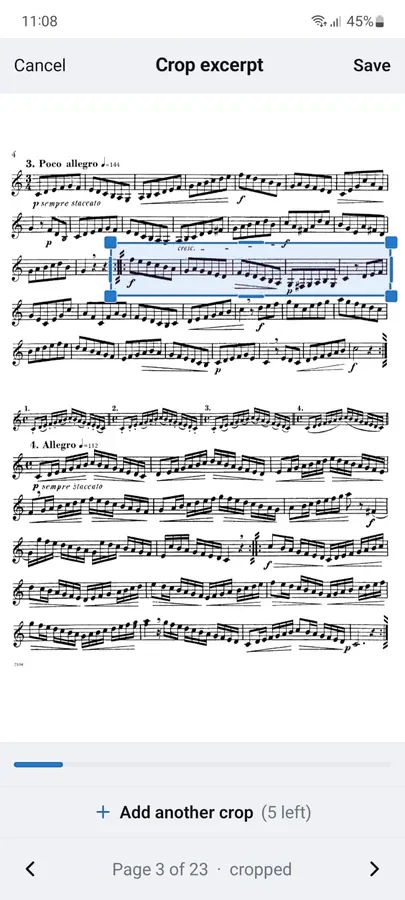
Drawing a crop across a line of a PDF page
Two cropped excerpts arranged on one canvas

The excerpt

Choose exactly what you want to practise

You don't need to have the entire page in front of you during practice.

Take a photo of the sheet music or import a PDF, select the area you want to work on and crop only the bars or exercises that matter.

The material is saved in your library and can be used again in different routines.

  • Photograph or import: Use the camera to photograph a page or upload a PDF file.
  • Crop what matters: Select only the passage, exercise, study or excerpt you want to practise.
  • Save and reuse: The material remains available in your library for future sessions.
  • Up to six excerpts on the same screen: Combine different parts of the same piece, studies, exercises or material from different sources in a single routine.
  • Reading size preserved: Excerpts maintain an appropriate scale so the music remains comfortable to read during practice.
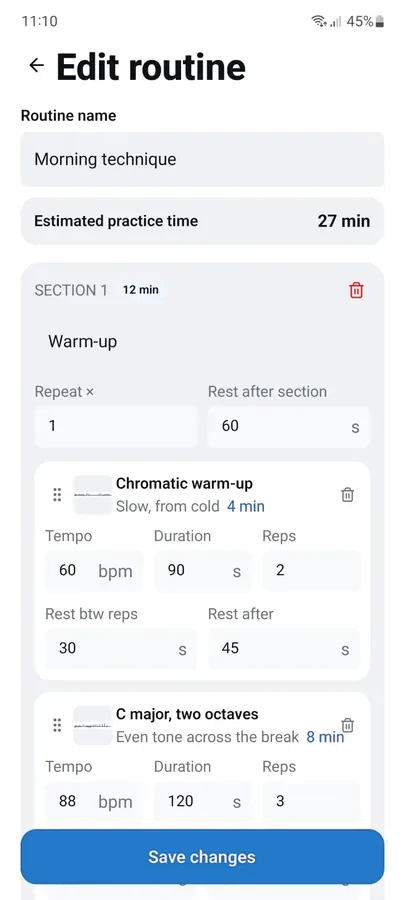
The routine builder, showing the estimated practice time
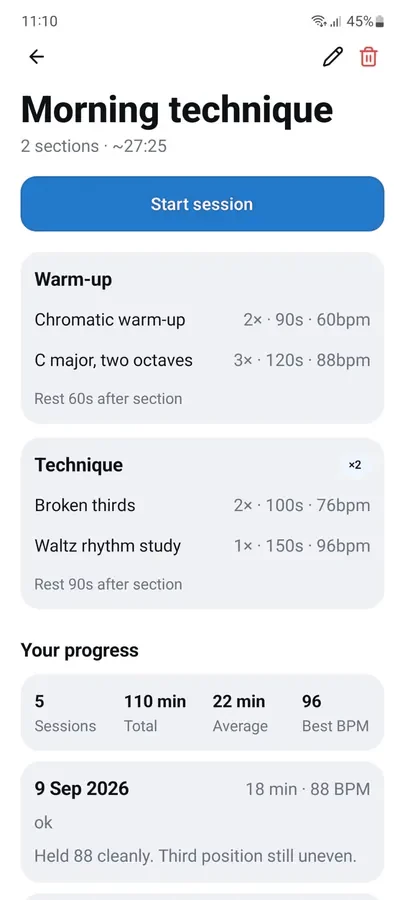
A routine's sections, exercises, rests and practice history

The routine

Build your practice around what you need to improve

A routine doesn't have to be the study of a piece.

It can be a sequence of technical exercises, a daily routine, an audition preparation session, orchestral excerpt practice, improvisation training, memorisation or a set of exercises created specifically to solve a problem.

It can also be used to organise music theory sessions — such as sight-reading or sight-singing — or any other activity that benefits from repetitions and rest periods.

And the logic isn't limited to music. You can create a routine to study a theatre script, memorise text or divide school material into study blocks before a test.

Build your routine the way a coach plans a workout.

  • Sections with different objectives and exercises with their own sets.
  • A defined number of repetitions for each exercise.
  • Scheduled rest between repetitions and after each exercise.
  • A specific tempo for each exercise, integrated with the metronome when necessary.
  • Reorganise the order by dragging blocks; the total session time updates automatically.
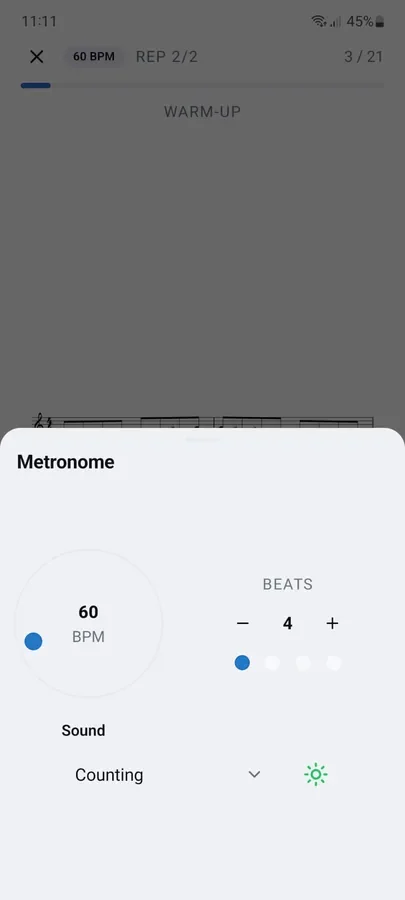
The metronome drawer: tempo, beats and click sound
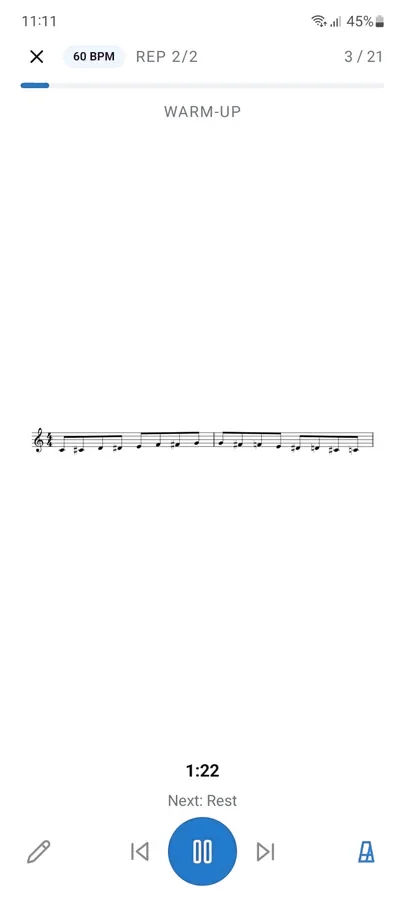
A routine in progress: the excerpt, the tempo and the timer

The session

Start and focus on what you're doing

Once you start the session, the app takes care of time management.

  • Configurable metronome: Hear the click, feel the pulse or see the visual signal.
  • Four different click sounds or a voice: Choose how you want to follow the beat.
  • Automatic timer: The app tells you when each repetition starts, when to rest and when to move on to the next exercise.
  • Zoom gestures and annotations: Use pinch-to-zoom to enlarge or reduce the material and add annotations to the notes during practice.
  • Landscape mode: For wider excerpts, while keeping the controls out of the way.
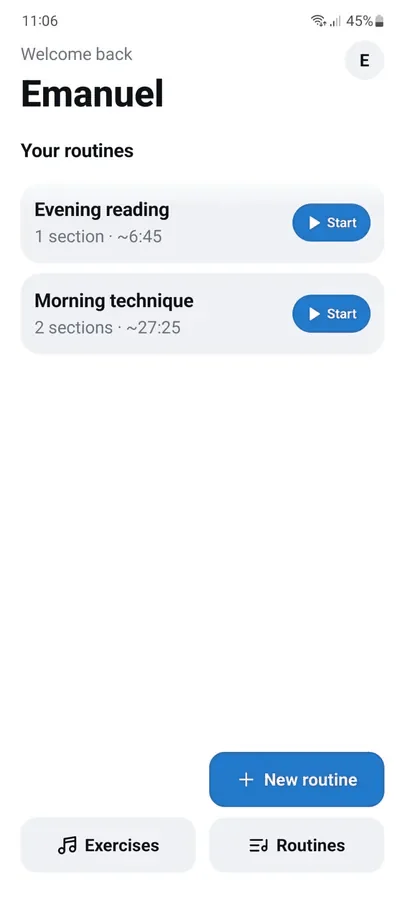
The home screen, with each routine's running time
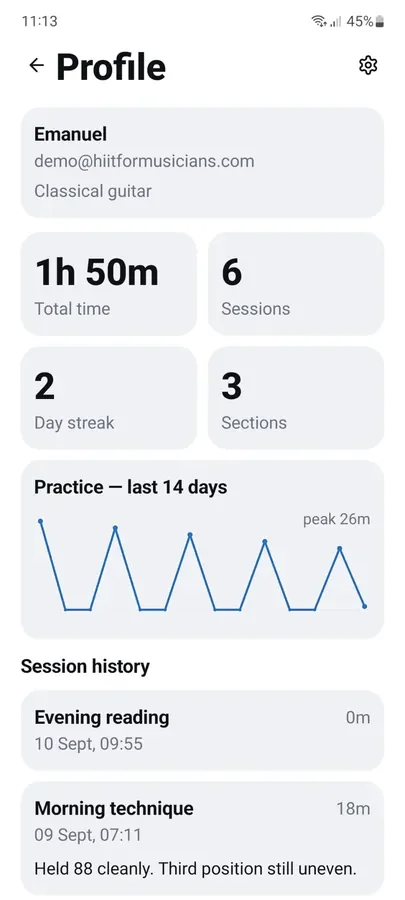
The profile screen: totals, streak and the last fortnight

The record

What you actually did, not what you intended to do

The difference between planning a session and completing it is reflected in the data that gets recorded.

  • Tempo reached, recorded for each session.
  • Notes about what went wrong, written while the experience is still fresh.
  • Totals per routine, averages and your best tempo.
  • Separate history for each routine.
  • Works offline: Sessions run without an Internet connection, are saved on your phone and automatically synced when you reconnect.

Ideal for practice rooms, rehearsals and other places without an Internet connection.

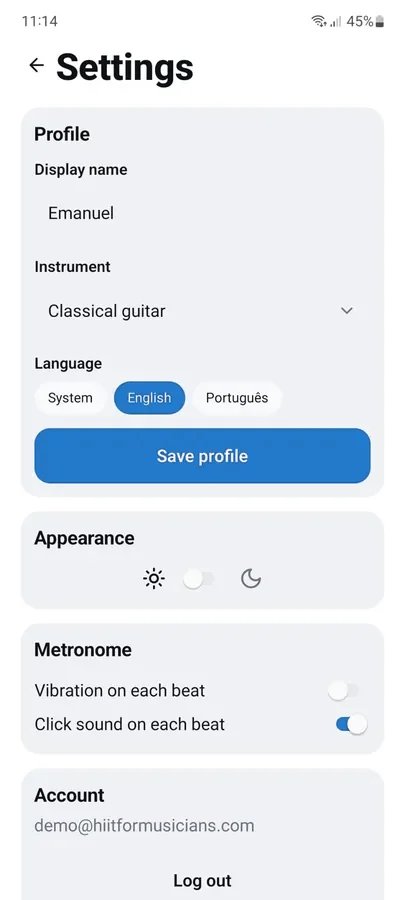
Settings: instrument, language, theme and metronome
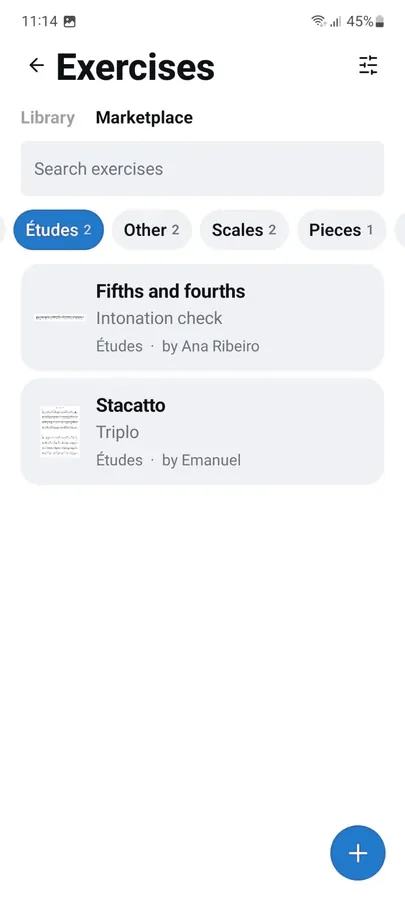
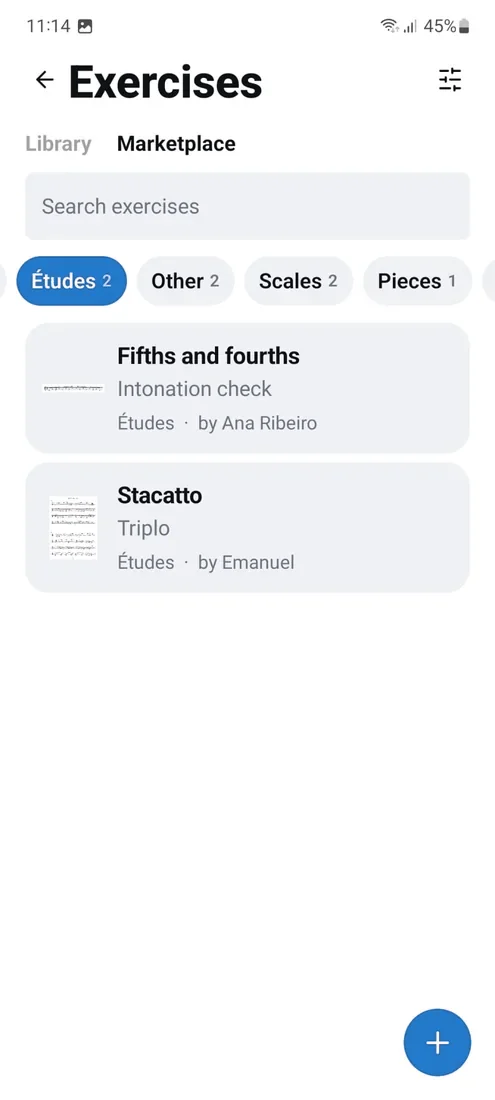
The marketplace, with exercises grouped by category

Sharing

Exchange exercises and routines with students or colleagues

Create an exercise or routine and, if you want, make it public so that it becomes available in the app's marketplace, with attribution to its creator.

Anyone can copy the exercise to their own library and adapt it to their practice.

You can share technical exercises, routines, studies or other material that you have permission to distribute.

  • Public or private option for each exercise.
  • Browse and filter by instrument or category.
  • Available in English or Portuguese.
  • Light or dark theme.

Frequently asked questions

The most common questions

How much does it cost?

Nothing at the moment.

The app is currently available to a limited group of testers while it is being finalised. There are no subscriptions or payments of any kind.

If that changes, it will be announced here with a clear price before you are asked for any card details.

Where can I download it?

It is an Android app and is currently being distributed directly to testers.

The iOS version will follow.

Email [email protected] to join the testing group. An official store release is on the way.

Do I need to be connected to the Internet?

Only to sign in, upload files or share exercises.

You don't need a connection to practise. The session runs offline, is saved on your phone and automatically syncs the next time you have a network connection.

Can I use music from a method book I own?

You can use your own study materials and content that you have the right to access.

Excerpts remain private in your account unless you choose to share them.

Making something “public” makes it available to other users, so only share content that you are authorised to distribute.

The app is not intended for sharing entire copyrighted books.

Does it work for any instrument?

Yes.

The app isn't programmed for a specific instrument because it treats sheet music as images.

Anything you can photograph will work — musicians playing different instruments, singers and drummers can use it in the same way.

You can set your instrument to filter the exercise marketplace.

What kind of things can I practise?

The app was designed with structured musical practice in mind, but its logic can be used for many types of learning.

You can use it for studies, technical exercises, daily routines, repertoire passages, orchestral excerpts, improvisation, memorisation, music theory, sight-reading, sight-singing, audition preparation and specialised problem-solving.

But it doesn't stop there.

The same structure of sets, repetitions and rest periods can be useful for memorising a theatre script, preparing a presentation, studying school material or dividing a revision session into blocks before a test.

The app doesn't tell you what to study. It gives you the tools to structure, control and repeat what you have decided to learn.

Is the app only for music?

Not necessarily.

The app was designed for musicians, and this is where its features make the most sense — especially when working with visual material, a metronome or structured exercises.

However, the fundamental principle — breaking work into focused blocks, repeating, resting and tracking progress — can be applied to other forms of study and memorisation.

What do you do with my data?

We store the data required for the app to function, such as your email address, the exercises you upload and the sessions you record.

There is no advertising, we do not track you for advertising purposes and we do not sell your data to third parties.

You can find all the details in our privacy policy.

Our story

From interval training to Intelligent Training

The idea was born far from practice rooms, conservatories and concert halls.

In a completely different world, the fitness industry popularised a training method known as High-Intensity Interval Training (HIIT). Its premise was simple: alternate short periods of intense effort with moments of recovery, creating highly efficient sessions designed to maximise results.

But what caught our attention was not the physical side of the method. It was the philosophy behind it: the clarity of purpose, the structure, the discipline — the idea that every minute had a specific function and contributed to a measurable outcome.

This led to a simple question:

Why do so many musicians still measure the quality of their practice by the number of hours spent rather than by the effectiveness of those hours?

Every musician knows the feeling of spending countless hours with an instrument only to finish the day unsure of what has actually improved. More often than not, the problem is not a lack of dedication. It is the absence of a framework that turns effort into deliberate progress.

The goal was never to transfer a fitness method directly into music, but to take the principles that made it work — focus, intensity, structure, clear objectives and intelligent time management — and reinterpret them for the challenges of musical practice.

As the concept evolved, it became clear that it was no longer just about intervals. It was about practising with purpose, learning with intention, and developing through a process that is both demanding and strategic. That realisation led to a new name:

High Intensity Intelligent Training

Intensity remained, because meaningful growth still requires commitment, concentration and focused effort. Interval was replaced by Intelligent, reflecting a broader vision: excellence is not achieved simply by working harder, but by working smarter.

It is not a translation of HIIT into music. It is a reimagining of the idea — a framework redesigned for musicians, built on the belief that every practice session should be structured, efficient, measurable and purposeful.